פתח תפריט ניווט

קטגוריות ראשיות

הזמנות ושירות לקוחות 1700-50-15-50

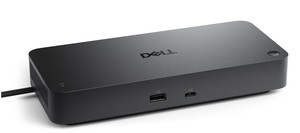
תחנת עגינה Dell Performance Dock – WD19DCS

הגבר את הספק המחשב שלך עד ל-210W בתחנת העגינה הכפולה USB-C החזקה והמודולרית הראשונה בעולם עם עיצוב מוכן לעתיד.
WD19DCS היא גרסה פשוטה של ​​WD19DC ללא יציאות 3.5 מ"מ. שלוש שנים אחריות DELL ישראל
WD19DCS
מחיר: 1,668 ₪
משלוח חינם
משלוח עם שליח עד לבית הלקוח: 0 ₪
אחריות: שלוש שנות אחריות באתר הלקוח DELL ישראל
זמן אספקה: 4 ימי עסקים , קיימת אפשרות לאיסוף עצמי
למה לקוחות קונים אצלנו:
  • זמן אספקה: עד 4 ימי עסקים 
  • אחריות: שלוש שנות אחריות באתר הלקוח DELL ישראל  
  • אפשרות לעד 36 תשלומים (ועד 4 תשלומים ללא ריבית) 
  • משלוח עם שליח עד לבית הלקוח, קניה מאובטחת ושירות לקוחות מעולה 
שלוש שנות אחריות באתר הלקוח DELL ישראל חודשי אחריות
משלוח חינם משלוח חינם
קניה בטוחה

מידע נוסף

Dell Performance Dock – WD19DCS


Boost your PC’s power up to 210W on the world’s most powerful and first modular Dual USB-C dock with a future-ready design.

WD19DCS is a simplified version of WD19DC without 3.5mm ports


Power your connections

Power your day: Dell ExpressCharge allows you to charge up to 80% in one hour i, making it the most efficient way to manage the workday.

Adaptable to your workload: Conveniently choose between a single USB-C cable or dual USB-C functionality, a feature compatible with our Precision 7000 workstations. Plus, with magnetically separable USB-C cablesi, it is easy to get the flexibility you need.

Unmatched charging: Triple your power delivery and charge even faster with a dock that delivers up to 210W of poweri with dual USB-C connectors.


Built for the future

Mix and match: Evolve as your needs change with our most powerful and reliable dock. The future-ready design lets you swap out modules with ease if you need to do field replacements or upgrade your systems.

Ultimate connectivity: Dual USB-C connectivity makes it easier than ever to deliver power, data, audio and video as well as connect to system peripherals, no matter what system you use. Plus, with support for up to four displays, including a single 5K and dual 4K monitorsi, you can connect to everything you need.

Clean and clutter-free: Stay productive by mounting your dock behind your monitor or under your desk with the optional, secure VESA Mount, that offers the complete flexibility with the built-in 0.8 meter cable.

Information in a flash: With data transfer speeds of up to 10Gbps, you can stay productive when connected to all your devices.


Optimize your workspace

Smooth and seamless: Work without disruptions utilizing a single firmware on our most manageable docks ever. Plus, with Dell Client Command Suite and Microsoft System Center Configuration Manager, you can quickly and easily update your firmware without rebooting your dock.

Secure manageability: Keep your information safe with MAC Address pass-thru and remote port-disablement. Plus, with features like PXE Boot, Wake-on-LAN and more, it’s easier than ever to stay productive while managing your dock.


Ports & Slots

1. USB-C 3.1 Gen 2 | 2. USB-A 3.1 Gen 1 with PowerShare | 3. DisplayPort 1.4 | 4. HDMI 2.0b | 5. USB-C Multifunction DisplayPort | 6. Dual USB-A 3.1 Gen 1 | 7. Gigabit Ethernet RJ45 | 8. Power In


Tech Specs

General

Product Type

Docking station

Width

8.1 in

Depth

3.5 in

Height

1.1 in

Weight

20.63 oz

Enclosure Color

Black

Video

Max Resolution Details

5120 × 2880 – 60 Hz

Networking

Data Link Protocol

Ethernet, Fast Ethernet, Gigabit Ethernet

Expansion / Connectivity

Interfaces

2 x display / video – DisplayPort – 20 pin DisplayPort

1 x display / video – HDMI – 19 pin HDMI Type A

1 x USB-C

3 x USB 3.1 Gen 1 – 9 pin USB Type A

2 x USB-C 3.1 Gen 2

1 x network – Ethernet 1000 – RJ-45

Miscellaneous

Cables Included

1 x dual USB-C cable – 2.6 ft

Features

Security lock slot (cable lock sold separately), 210W power delivery to Dell systems, 90W power delivery to non-Dell systems, wireless vPro

Security Slot Type

Noble Wedge security slot / Kensington security slot

Compliant Standards

DisplayPort 1.4

Power

Power Device

Power adapter

Voltage Required

AC 120/230 V (50/60 Hz)

Power Provided

240 Watt

System Requirements

OS Required

Red Hat Enterprise Linux, Windows 10, Ubuntu 18.04