פתח תפריט ניווט

קטגוריות ראשיות

הזמנות ושירות לקוחות 1700-50-15-50

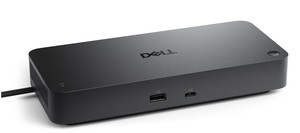
תחנת עגינה Dell Thunderbolt Dock WD22TB4 180W

יש לבדוק זמינות

תחנת עגינה מודולרית עם מודולים הניתנים להחלפה לשדרוגים קלים וטכנולוגיות SuperBoost לטעינה מהירה. מבוססת טנדרבולט 4

Dell Thunderbolt™ Dock – WD22TB4 מציע תאימות רחבה בין מחשבים ניידים מסחריים של Dell. הוא גם תואם למחשבים ניידים מיצרנים אחרים התומכים בתקנים בתעשייה עבור עגינה של Thunderbolt™. למגבלות תפקודיות עם מחשבים ניידים מיצרנים אחרים בהשוואה לטאבלטים עסקיים של Dell.

תחנת העגינה מבית DELL למחשבים ניידים עסקיים הכוללת כניסת TYPE-C

תמיכה בעד שלושה מסכים

רשת Ethernet, Fast Ethernet, Gigabit Ethernet

שלוש שנות אחריות ע"י DELL

WD22TB4
אחריות: שלוש שנות אחריות ע"י DELL
זמן אספקה: 4 ימי עסקים , קיימת אפשרות לאיסוף עצמי
למה לקוחות קונים אצלנו:
  • זמן אספקה: עד 4 ימי עסקים 
  • אחריות: שלוש שנות אחריות ע"י DELL  
  • אפשרות לעד 36 תשלומים (ועד 4 תשלומים ללא ריבית) 
  • משלוח עם שליח עד לבית הלקוח, קניה מאובטחת ושירות לקוחות מעולה 
שלוש שנות אחריות ע"י DELL חודשי אחריות
משלוח חינם משלוח חינם
קניה בטוחה

מידע נוסף

Dell Thunderbolt™ Dock – WD22TB4


Modular thunderbolt dock with swappable modules for easy upgrades and SuperBoost technologies for fast charging.


ExpressCharge technology

You’ll experience power delivery of up to 130W on Dell devices with ExpressCharge technology that enables:

80% charge in one hour​

35% charge in just 20 minutes

Future-made design

Swappable module lets you upgrade with ease to meet the needs of your IT environment.

Upgrade to get the latest in connectivity with not one but two Thunderbolt™ 4 ports for even more flexibility.


Multiply productivity

Connect displays and peripherals to your system with a single cable for ultimate productivity.
Thunderbolt™ 4 dock with the highest number of ports connects multiple 4K displays and Thunderbolt peripherals allowing you to not compromise with your work setup. Get the maximum from your peripherals with data transfer of 40 GB/s.


Intelligent and simple management

Work without disruption: Firmware updates can be completed in five to seven minutes without needing to reboot the system.

Easier for IT: Dell Client Command Suite and Microsoft System Center Configuration Manager offers a smoother firmware update experience. You can also streamline deployment and management with a single firmware.

Easier upgrades: Modularity allows for simple field replacement of the power cable or connectivity module.

Better support: Inventory management got easier since each has its own service tag, allowing IT to push firmware updates only to certain dock.

Secure manageability: Keep your information safe with MAC Address pass-thru and remote port-disablement. Plus, with features like PXE Boot, Wake-on-LAN, and more, it’s easier than ever to stay productive while managing your dock.


Connectivity Options


Ports & Slots:


1. USB-C 3.2 Gen 2

2. USB-A 3.2 Gen 1 with PowerShare

3. DisplayPort 1.4 (2)

4. HDMI 2.0


5. USB-C Multifunction DisplayPort

6. USB-A 3.2 Gen 1 port (2)

7. Gigabit Ethernet RJ45

8. Power In

9. Thunderbolt™ 4 (2)


מאפיינים עיקריים

  • Tech Specs 
  • General 
  • Power Provided 
  • 130W (Dell systems) 
  • 90W (non-Dell systems) 
  • Max Resolution Details 
  • 5K - 60 Hz (Single Display) 
  • 4K - 60 Hz (Quad Display) 
  • Interfaces 
  • 2 x Thunderbolt 4 
  • OS Required 
  • Windows 10, Windows 11, Ubuntu 20.04 or later 
  • Video 
  • Max Resolution Details 
  • 5K - 60 Hz (Single Display) 
  • 4K - 60 Hz (Quad Display) 
  • Networking 
  • Data Link Protocol 
  • Ethernet, Fast Ethernet, Gigabit Ethernet 
  • Expansion / Connectivity 
  • Interfaces 
  • 2 x display / video - DisplayPort - 20 pin DisplayPort (1.4) 
  • 1 x display / video - HDMI - 19 pin HDMI 2.0 
  • 1 x USB-C 3.2 Gen 2/DisplayPort 1.4 
  • 2 x USB 3.2 Gen 1 - 9 pin USB Type A 
  • 1 x USB-C 3.2 Gen 2 
  • 1 x network - Ethernet 1000 - RJ-45 
  • 1 x USB 3.2 Gen 1 with PowerShare 
  • 2 x Thunderbolt 4 
  • Miscellaneous 
  • Features 
  • Security lock slot (cable lock sold separately), 130W power delivery to Dell systems, 90W power delivery to non-Dell systems 
  • Security Slot Type 
  • Noble Wedge security slot / Kensington security slot 
  • Compliant Standards 
  • DisplayPort 1.4 
  • Power 
  • Power Device 
  • Power adapter 
  • Voltage Required 
  • AC 120/230 V (50/60 Hz) 
  • Power Provided 
  • 130W (Dell systems) 
  • 90W (non-Dell systems) 
  • System Requirements 
  • OS Required 
  • Windows 10, Windows 11, Ubuntu 20.04 or later 
  • Dimensions and weight 
  • Width 
  • 8.1 in 
  • Depth 
  • 3.5 in 
  • Height 
  • 1.1 in 
  • Weight 
  • 22.93 oz 

פרטים טכניים

פרטי המוצר
  • Product Type
  • Docking station
  • Width
  • 8.1 in
  • Depth
  • 3.5 in
  • Height
  • 1.1 in
  • Weight
  • 15.87 oz
  • Video
  • Max Resolution Details
  • 5120 x 2880 - 60 Hz
  • Networking
  • Data Link Protocol
  • Ethernet, Fast Ethernet, Gigabit Ethernet
  • Expansion / Connectivity
  • Interfaces
  • 2 x display / video - DisplayPort - 20 pin DisplayPort
  • 1 x display / video - HDMI - 19 pin HDMI Type A
  • 1 x USB-C / DisplayPort
  • 3 x USB 3.2 Gen 1 - 9 pin USB Type A
  • 2 x USB-C 3.2 Gen 2
  • 1 x network - Ethernet 1000 - RJ-45
  • Miscellaneous
  • Features
  • Security lock slot (cable lock sold separately)
  • Security Slot Type
  • Noble Wedge security slot / Kensington security slot
  • Compliant Standards
  • DisplayPort 1.4
  • מפרט טכני
  • השוואת מוצרים