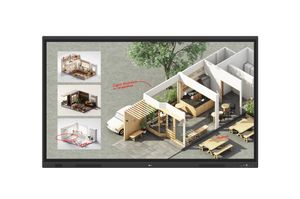
IFX654-4P
VAP400 (Vestel Android Platform 400)
High performance dual-pen writing experience up to 20 points
Easy to use personalized user interface
Enhanced inputs/outputs selection via rear and front connections
Selected tools and applications for engagement and productivity
Flexible capture of any content and annotation over any source
Powerful Front Facing Speakers 2 × 20W
Improved Fluent Touch Experience
Incorporating the latest 20 point IR Touch technology with faster response.The new IFX range is designed to allow multiple users to interact simultaneously.
The super smooth surface allows for a highly precise and user-friendly writing experience.

Impressive 4K Performance
Exceptional viewing creates superior picture quality with 4K resolution and 178 degree viewing angle.

Profile Management for Customization and
Security
use the display only after they are logged in using their identified PINs.The cloud-based Vestel Board
Management system can be used by IT managers to set up teacher profiles securely:
User/Password creation
NFC ID settings
UI customization for background and profile images
Favorite apps selection for users
Display and group management
Profile Management for Customization and
Security
One of the prominent features of the New IFX Series is the profile management system.Users are allowed to use the display only after they are logged in using their
identified PINs.The cloud-based Vestel Board
Management system can be used by IT managers to set
up teacher profiles securely:
User/Password creation
NFC ID settings
UI customization for background and profile images
Favorite apps selection for users
Display and group management

Wireless Screen Sharing
Wireless screen sharing empowers users to share any external content without any cables. Utilizing embedded Wi-Fi technology New IFX Series provides Eshare application,multi-screen Interactive Screensharing Tool.
Using only QR codes, users can connect to the display by any device(Windows, Android,MacOS, iOS, Chrome), create Multiscreen experience, and Annotate on the
display wirelessly
![]()
Array of Android Applications Delivers Different Ways of Student Engagement Offering the fundamental applications,New IFX Series allows users to annotate on Whiteboard,share content remotely via Eshare, work on documents in OfficeSuite,open media and browse through your documents and folder

Whiteboard Application for Flawless Teaching
Experience New IFX Series offers a compact whiteboard application design for teachers with the required tools to annotate,draw or highlight using 2 different tip sizes with auto-recognition,add texts and media to work on during classes. Whiteboard application can quickly open any cropped screenshots with any annotation done over any source
![]()
Internet Browser to Access Internet Content for Classroom Using Chromium as the embedded internet browser,New IFX Series is able to access the internet and with the help of the quick palette,teachers will be able to annotate the content and take screenshots and work on them for more effective learning